Counter-Service Menu Upsell Zones: How to Guide Better Orders
A good counter-service menu does more than list items. It quietly answers the questions customers have while they are standing in line: what should I get, what comes with it, what should I add, and how do I avoid holding everyone up? When those answers are clear, upsells feel like service. When they are buried, upsells feel like pressure at the register.
Digital menu boards are especially useful because they let restaurants control attention without reprinting a menu every time a special changes. The challenge is restraint. A screen can show photos, motion, sections, badges, and rotating offers, but that does not mean every inch should sell something. The best counter-service menus create specific upsell zones that support how people already decide.
Start with the customer's decision path
Most counter-service guests do not read a menu from top left to bottom right like a document. They scan. First they look for a familiar category, then they compare two or three options, then they check price and modifiers. Upsells work best when they appear at the moment the next decision makes sense.
For example, a burger guest is not ready to think about dessert before choosing a main item. They are ready to think about a combo, a side, a size upgrade, or a drink. A cafe customer choosing a latte may be open to an extra shot, a seasonal flavor, or a pastry. A bowl concept might pair proteins with premium toppings and drinks. The menu should follow that sequence instead of treating every add-on as equal.
Use a hero zone for one high-value offer
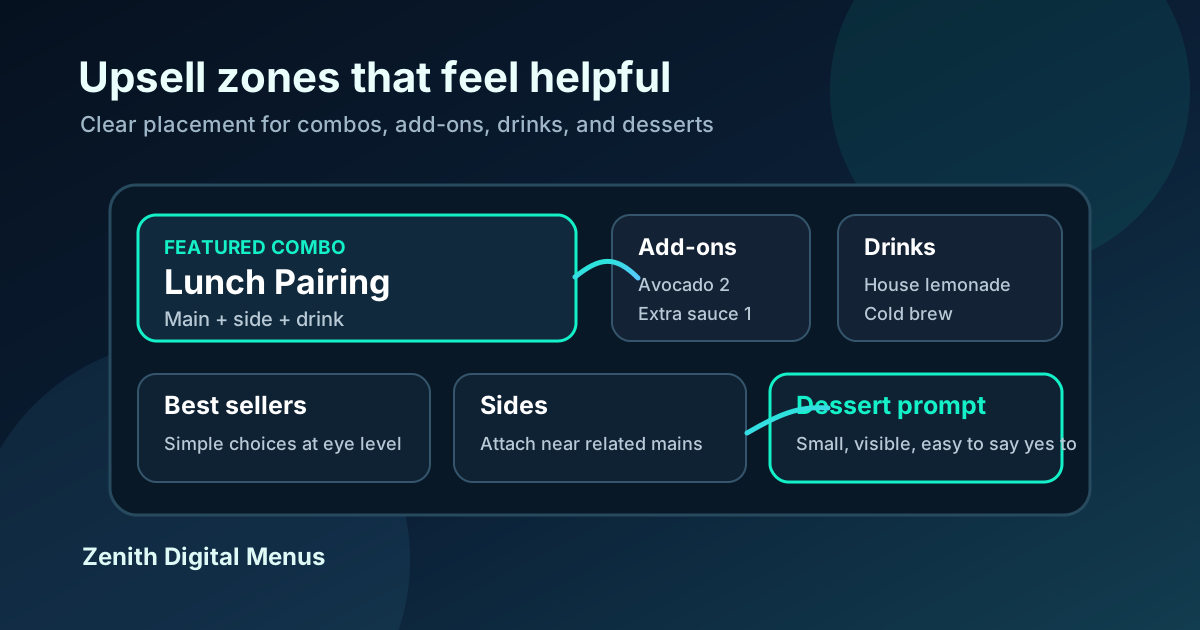
Every digital menu should have a primary feature area, but it should not become a rotating junk drawer. The hero zone is the place for the offer you most want customers to notice today: a profitable combo, a limited-time item with strong inventory support, a family meal, or a seasonal drink that photographs well.
Keep this zone simple. Use one strong image if the food looks appetizing at screen size. Add a short name, a clear inclusion line, and a price or starting price. Avoid stacking three competing specials in the same space. If everything is featured, nothing is featured, and the customer falls back to the item they already know.
Build combo zones around clarity
Combos are usually the cleanest upsell because they help the customer complete an order. The mistake is making combo rules hard to understand. A counter-service guest should be able to see what is included without reading a paragraph or asking the cashier to translate fine print.
Use a consistent structure for every combo: item name, included side, included drink, and any upgrade choices. If the restaurant has many sides, show the default side on the main board and move the full side list to a smaller nearby section. If large size, premium protein, or specialty drink upgrades cost more, show the price next to the choice instead of hiding it in a note.
Put add-ons next to the category they improve
Add-ons sell better when they are contextual. Avocado, bacon, extra sauce, premium cheese, protein upgrades, extra espresso shots, alternative milk, and flavor syrups should sit close to the category they modify. A generic add-ons box at the bottom of the menu is easy to ignore because it arrives after the customer has already made the decision.
Context also protects speed. If the cashier has to ask every guest whether they want every possible add-on, the line slows and the prompt starts to feel scripted. A visible add-on zone lets customers self-select. Staff can then reinforce the best pairings instead of reciting a long list.
Give drinks their own visible path
Drinks are often one of the easiest attachments to miss. Many menus place drinks in a small corner because the operator assumes customers will ask. Some will, but many will not, especially during a rush. A clear drink zone near combos and popular mains can lift attachment rate without making the board feel salesy.
Feature the drinks that make sense for the concept and margin. A quick-service restaurant might highlight house lemonade, iced tea, and fountain drinks. A coffee shop might split hot drinks, cold drinks, and seasonal drinks. A bar or brewery should make rotating taps, tasting flights, and non-alcoholic options easy to find. Do not bury beverage prices in a dense list if drinks are a major part of profit.
Use dessert and snack prompts at the end of the scan
Desserts, cookies, pastries, chips, and small snacks usually work as final prompts. They should be visible after the main decision, not louder than the main menu. A small photo, short label, and simple price can be enough. The goal is to make the extra item feel like an easy yes.
Placement matters. Put dessert and snack prompts near the lower right or near the register-facing side of the board where customers naturally look after choosing a meal. If the prompt rotates, keep it slow and stable. Customers should not lose the dessert option before they can read the name or price.
Match upsell zones to kitchen reality
A menu can only sell what the operation can deliver. Before giving an item premium placement, check prep speed, stock reliability, packaging, and staff confidence. A high-margin add-on that slows every ticket may not belong in the hero zone during lunch. A dessert with inconsistent availability should not be the main visual on the board.
This is where digital menus help. You can schedule different zones by daypart. Breakfast can feature coffee upgrades and pastries. Lunch can feature combos and drinks. Late afternoon can feature snacks or happy hour items. Dinner can feature family meals or desserts. The screen should reflect the menu the restaurant can execute well at that exact time.
Keep the design calm enough to read
Upsell zones fail when the board becomes visually noisy. Too many badges, animations, colors, and price treatments force customers to work harder. Use contrast and hierarchy instead of decoration. The main menu should stay readable from the back of the line, while upsell zones should guide attention with size, spacing, and a restrained accent color.
Motion can help if it is subtle. A gentle highlight on a seasonal drink or a slow transition between dayparts can work. Fast animations, flashing deals, or panels that change before the customer finishes reading create friction. The more complicated the ordering environment, the calmer the screen should be.
Measure whether the zones are working
Do not judge the menu only by how it looks. Track whether the intended behavior changes. Useful numbers include average ticket, combo percentage, drink attachment rate, add-on attachment rate, dessert attachment rate, and time from greeting to completed order. Compare results by daypart so one strong period does not hide a weak layout elsewhere.
Small menu tests are enough. Move the drink zone closer to combos for two weeks. Feature one dessert instead of three. Rename an add-on to make the benefit clearer. Swap a low-performing hero offer for a simpler bundle. Digital menus make these changes easier, but the real value comes from treating the menu as a sales and service tool, not a finished poster.
The bottom line
Helpful upsells are not random prompts. They are placed where the customer is already making a related decision. A clear hero zone, simple combo architecture, contextual add-ons, visible drinks, and restrained dessert prompts can raise order value while making the line feel smoother.
If your counter-service menu relies on staff to explain every upgrade, the screen is not doing enough work. Start by mapping the customer's decision path, then give each upsell a clear job and a clear location. The best menu boards do not push harder. They make better choices easier to see.
Need a clearer upsell layout?
Zenith Digital Menus designs, installs, and updates restaurant menu screens so counter-service menus stay readable, current, and easier to sell from.
Get a free consultation or call 916-960-3519.