Restaurant Digital Menu Hierarchy: What to Put on the First Screen
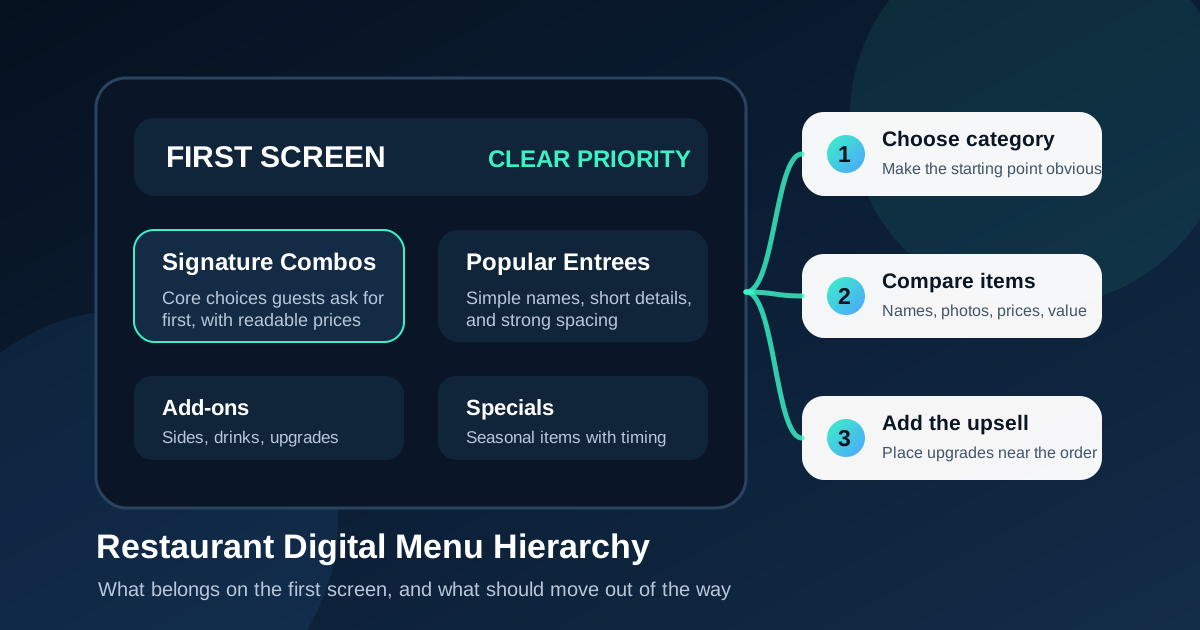
The first screen of a digital menu has a job that is easy to underestimate. It is not just the most visible screen. It is the screen that tells guests how to order, what the restaurant is known for, and where their attention should go first. If that screen tries to show everything, customers slow down. If it hides the best items, the restaurant misses easy revenue. Good hierarchy turns the screen into a guide instead of a wall of options.
Many restaurants move from printed menus to digital boards by copying the old layout onto a screen. That usually creates crowded columns, small type, and weak priorities. A digital menu should be built around the real ordering moment. Guests are standing in line, reading from several feet away, thinking about budget, appetite, time, and whether the person behind them is waiting. The first screen has to simplify that moment.
Start with the customer decision path
Before deciding what goes on screen one, map the choices a customer makes in order. A quick-service guest might choose a category, choose an entree, choose a size or protein, then add a drink or side. A cafe guest might choose hot or iced, then size, then flavor, then pastry. A pizza shop guest might choose whole pie or slice, then crust, then toppings, then combo.
The first screen should match that path. Put the starting decision near the top or left side, depending on the layout and viewing distance. If guests usually begin with combos, do not bury combos below individual items. If most people ask what is popular, show the house favorites early. Hierarchy works best when it follows how people actually order, not how the kitchen organizes inventory.
Lead with items that define the restaurant
Every restaurant has items that explain the concept. A burger shop may lead with signature burgers. A taco shop may lead with plates and popular proteins. A coffee shop may lead with espresso drinks and seasonal drinks. These items deserve first-screen space because they help new guests understand the restaurant quickly.
This does not mean the highest-margin item always gets the biggest area. It means the first screen should answer the question, what should I order here? Once that question is answered, the menu can guide customers toward profitable upgrades, premium versions, and add-ons. If the first screen only promotes margin without giving guests orientation, it can feel random or pushy.
Keep category count under control
Digital menus often become hard to read because too many categories compete at the same level. Burgers, sandwiches, salads, sides, kids meals, drinks, desserts, family meals, specials, sauces, catering, and delivery notes cannot all be the hero. When everything is equally loud, nothing is clear.
For most restaurants, the first screen should feature three to five major groups. Secondary categories can move to another screen, rotate in a lower-priority zone, or appear as a smaller add-on section. If a category is rarely ordered at the counter, it probably does not need first-screen priority. If staff constantly answer questions about a category, it may deserve a clearer place.
Use size and position to show priority
Hierarchy is created through size, position, contrast, spacing, and repetition. The most important items should have larger headings, more breathing room, and stronger visual treatment. Lower-priority items can still be visible, but they should not compete with the main decision areas.
Top placement is useful, but it is not enough by itself. A small item at the top can still be ignored if the rest of the board is visually noisy. Likewise, a featured combo in the middle can perform well if it has a strong photo, clear name, short description, and readable price. The screen should create a clear path: category, item, value, price, next step.
Decide what belongs off the first screen
One of the best design decisions is choosing what not to show first. Full ingredient lists, long modifier rules, catering details, loyalty program fine print, and every possible sauce choice usually belong elsewhere. They can live on a second screen, QR menu, printed handout, staff prompt, or point-of-sale modifier flow.
Removing clutter does not mean hiding information. It means putting information where it helps the order. A guest deciding between two lunch combos needs item names, photos, prices, and basic included items. They do not need a paragraph about every substitution. The cashier or QR menu can handle the detailed branch after the main choice is made.
Make upsells feel like the next logical step
A strong first screen does not only list entrees. It should show the next profitable step in a way that feels helpful. That might be make it a combo, add a premium side, try the seasonal drink, or upgrade to a larger size. The key is to place the upsell near the item it supports instead of isolating it in a disconnected corner.
For example, if chicken sandwiches are the hero, the combo message should sit close to the sandwich section. If a drink has high margin and pairs well with spicy items, it can appear beside those items. If dessert is an impulse buy, it may work best near the pickup or payment area rather than on the first ordering screen. Hierarchy should make the upsell feel like service, not interruption.
Design for real viewing distance
First-screen hierarchy fails when the design is judged only on a laptop. Restaurant screens are read from the line, from the doorway, from a crowded counter, and sometimes under glare. The most important content should be readable from the farthest realistic ordering point. If the main entree names or prices are hard to read from that distance, the hierarchy is not working.
Use fewer words, larger type, stronger contrast, and consistent spacing. Avoid putting essential information inside thin badges or low-contrast photo overlays. Photos can support appetite appeal, but they should not make prices or names harder to read. The first screen should work even when a guest glances up for only a few seconds.
Review sales data without letting it control everything
Sales data can reveal which items deserve more space, but it should be interpreted carefully. A low-selling item might be unpopular, or it might be poorly placed. A top-selling item might deserve less visual emphasis if customers already know to order it. A profitable item with good kitchen speed may deserve more first-screen attention even if it is not the current top seller.
The best review combines sales data, staff feedback, kitchen capacity, and customer questions. If guests keep asking where the lunch special is, the hierarchy needs work. If a featured item creates kitchen bottlenecks, it may need to move down during rush periods. Digital menus make these adjustments easier because the restaurant can test small changes without reprinting anything.
Build a simple first-screen checklist
Before publishing a new digital menu layout, run a short checklist. Does the first screen show the restaurant's core offer? Are the top three to five categories obvious? Are item names and prices readable at real distance? Are high-margin add-ons placed near relevant items? Is unnecessary detail moved somewhere better? Does the layout help staff answer fewer basic questions?
If the answer is yes, the first screen is doing its job. It is giving guests confidence, helping the line move, and guiding orders toward better choices. A digital menu does not need to be flashy to perform well. It needs a clear hierarchy that respects how customers decide.
Clarity is the best first-screen strategy
The first screen should make ordering feel easier than it did before. Lead with the items that define the restaurant, limit competing categories, use visual priority on purpose, and move secondary details out of the way. Then review how customers and staff respond during real service.
When hierarchy is clear, guests spend less time searching and more time choosing. Staff repeat fewer explanations. Featured items get noticed. Upsells make more sense. That is the quiet advantage of a well-designed digital menu board: it improves the ordering experience without making the restaurant feel overdesigned.
Need a cleaner first screen?
Zenith Digital Menus designs, installs, and manages restaurant menu boards with clear hierarchy, readable layouts, and practical update workflows. Request a consultation.