Restaurant Menu Upsell Map: How to Place Add-Ons Without Slowing Orders
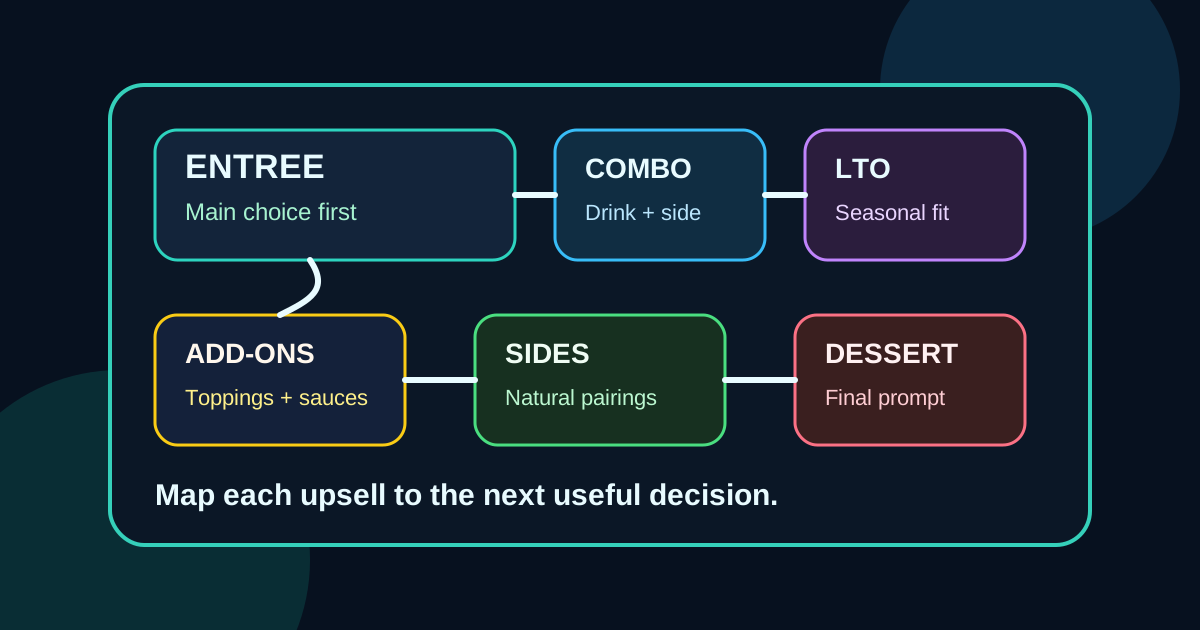
Upsells work best when they feel like useful next steps, not interruptions. A guest who has chosen a sandwich may want a drink, a side, a premium topping, or a dessert, but only if those options appear at the right moment and do not make the order harder to understand. Digital menu boards give restaurants more control over that moment than printed menus, but they also make it easy to overdo it.
A restaurant menu upsell map is a simple plan for where add-ons, upgrades, bundles, and limited-time offers belong in the ordering path. Instead of scattering promotions wherever there is blank screen space, the map connects each offer to the decision the guest is already making. That keeps the menu readable, protects service speed, and gives staff a cleaner path for suggestive selling.
Start with the core order path
Before adding any upsell zones, write down the way a normal order is built. For a counter-service restaurant, the path might be entree, size, side, drink, sauce, dessert, then payment. For a cafe, it might be hot drink or cold drink, size, milk, flavor, pastry, then loyalty prompt. For a pizza shop, it might be pizza size, specialty or build-your-own, crust, wings, drink, and deal.
This path matters because upsells should not compete with the main decision. If guests are still trying to understand categories, a promotion for a premium dessert can become noise. If they have already chosen an entree, a combo upgrade suddenly makes sense. The goal is to place each suggestion where it helps the customer complete the order.
Separate helpful upsells from clutter
Not every extra item deserves menu board space. A helpful upsell either improves the meal, simplifies the decision, raises the ticket in a natural way, or supports a current business goal. A clutter upsell only fills space or pushes an item the guest does not connect to their order.
Good examples include adding a drink to a lunch entree, pairing a pastry with morning coffee, showing chips and salsa beside taco plates, or offering a family-size side near family meals. Weak examples include promoting a random appetizer on every screen, flashing too many limited-time offers, or using a large photo for a low-margin add-on that rarely changes the order.
Create zones by decision type
A strong digital menu usually needs a few repeatable zones rather than a new layout for every special. One zone can support combo upgrades. Another can support premium add-ons. Another can handle desserts, drinks, or seasonal items. Once the zones are defined, updates become easier because the team knows where each type of offer belongs.
For example, an entree screen might reserve the lower right area for make it a combo messaging. A drink screen might reserve one tile for premium seasonal drinks. A checkout or final decision screen might reserve space for desserts or grab-and-go items. This structure prevents the menu from turning into a collage of unrelated promotions.
Match the offer to the guest's level of commitment
Guests early in the decision process need clarity. Guests later in the decision process are more open to add-ons. That is why the same offer can perform differently depending on placement. A dessert offer shown before guests understand the main menu may be ignored. The same dessert shown after lunch combos may feel like an easy finishing touch.
Use high-commitment moments for stronger upsells. After a guest chooses a burger, suggest fries, drink, or premium topping. After a guest chooses a coffee, suggest an extra espresso shot, alternative milk, or pastry. After a guest chooses a family meal, suggest a second side, a larger drink bundle, or dessert pack. The offer should feel connected to what the guest just decided.
Use plain language for the upgrade
Upsell copy should be short because customers are reading while standing in line. Avoid clever names that hide the value. Say Add a drink and side, Make it spicy, Upgrade to large, Add avocado, Try it with cold foam, or Finish with a cookie. The copy should make the action obvious before the guest reaches the register.
Prices need the same clarity. If the upgrade costs 2.50, show that. If the bundle saves money, say what is included. If the offer only applies to certain entrees, keep the language tight and visible. Hidden conditions create staff explanations, and staff explanations slow the line.
Keep photos selective
Photos can make upsells more appealing, but too many photos can weaken the whole board. Use images for items where appearance drives the decision, such as desserts, premium drinks, loaded sides, seasonal bowls, shareables, or new products. For routine upgrades like extra sauce or a larger size, text may be enough.
Accuracy matters. If the photo shows a loaded version of an item, the menu should make clear whether that is the standard item or an upgraded version. A misleading image can create disappointment at pickup and extra questions at the counter. The best upsell image makes the value obvious without promising something the kitchen will not serve.
Protect service speed during rush periods
A profitable upsell is not worth much if it slows every order. During busy hours, the menu should emphasize offers that are easy to explain, easy to ring up, and easy for the kitchen or bar to execute. A complicated custom item may be better for slower periods. A simple combo, bottled drink, prepared dessert, or fast side may be better during a rush.
Digital menus can support this by changing emphasis by daypart. Breakfast can promote coffee pairings and pastries. Lunch can promote combos and quick sides. Dinner can promote shareables and desserts. Late night can promote simple bundles with fewer choices. The menu does not need to show every upsell all day.
Give staff the same map
The best menu board will underperform if staff do not know the offer. Share the upsell map with cashiers, servers, and managers. Explain which items are being promoted, where they appear on the screen, how to ring them up, and what phrase staff should use when a guest hesitates.
Staff feedback also reveals where the map is weak. If employees say guests keep asking what comes with the combo, the screen needs clearer bundle copy. If they say a promoted dessert is hard to find in the POS, the workflow needs fixing. If they say a premium topping creates kitchen delays, the offer may need a different daypart or a different placement.
Measure one behavior at a time
Upsell maps should be improved with simple measurements. Pick one behavior and watch it for a week or two. Track drink attachment, combo rate, dessert sales, premium topping use, average ticket, or questions per shift. Do not change five promotions at once and then guess what worked.
When an offer works, keep the structure and test a new item in the same zone. When it fails, check visibility, wording, price, staff awareness, and operational fit before assuming customers do not want it. Often the problem is not the item. It is that the offer appeared too early, too late, too small, or disconnected from the main order.
Build a menu that sells without shouting
A good restaurant menu upsell map does not make the screen louder. It makes the buying path clearer. Guests see the main choice first, then the next useful addition, then the final decision. Staff get fewer awkward prompts. Managers get a repeatable way to test offers without redesigning the whole board.
Start with the order path, choose a few consistent zones, use clear language, keep photos selective, and measure one behavior at a time. That is how digital menu upsells become part of a better guest experience instead of another layer of menu clutter.
Want digital menus that sell without clutter?
Zenith Digital Menus designs, installs, and manages restaurant digital menu boards built around clarity, ordering speed, and practical upsell strategy. Request a consultation.