Seasonal Menu Board Readability Plan for Busy Restaurant Weeks
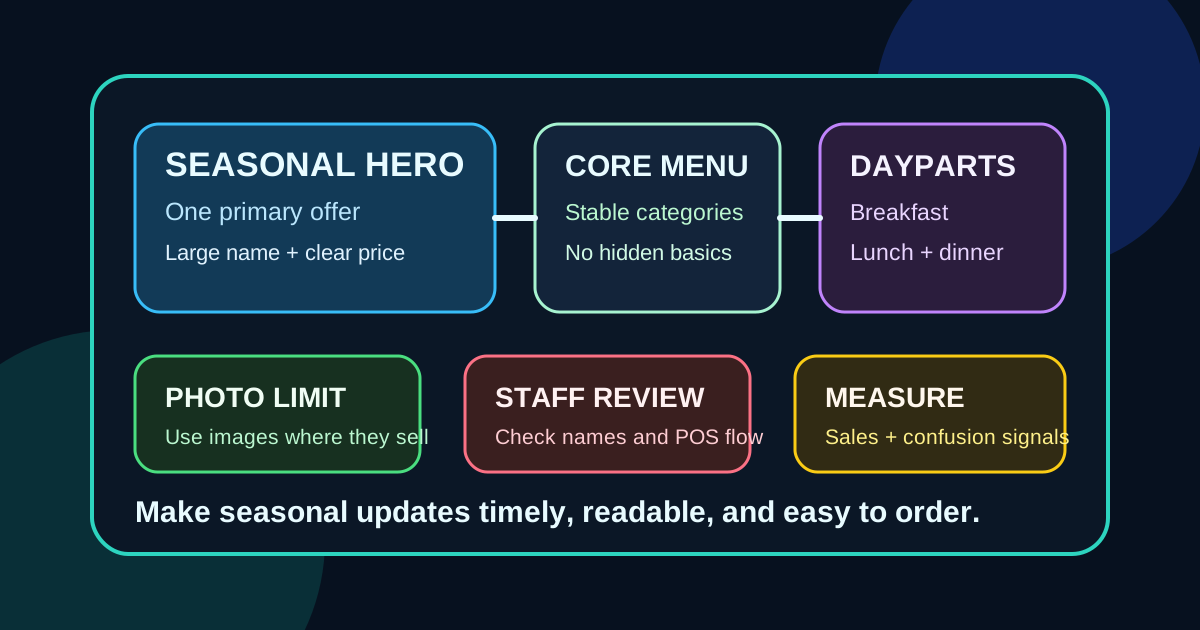
Seasonal specials can make a restaurant feel fresh, but they can also make a menu board harder to use. A summer drink, a holiday dessert, a game-day combo, and a limited-time entree all sound useful on their own. Put them on the screen at the same time, in the same visual style, and guests may stop reading. The line slows down, staff repeat the same explanations, and the seasonal push becomes noise.
A seasonal menu board readability plan solves that problem before the busy week starts. It gives every special a job, a place, and a limit. The goal is not to show less because digital screens can handle more. The goal is to show the right amount at the exact point where guests can act on it.
Start with the seasonal business goal
Before opening the design file, decide what the season is supposed to accomplish. A seasonal update might be about selling a high-margin drink, moving a limited ingredient, promoting catering, introducing a new dessert, supporting a local event, or making price changes feel normal. Each goal needs different screen treatment.
If the goal is speed during a holiday rush, the board should keep the core menu simple and make the special easy to order in one phrase. If the goal is discovery during a slower month, the board can use more descriptive copy and a larger photo. If the goal is margin, the special should sit near the category it naturally pairs with, not in a random banner that everyone learns to ignore.
Choose one primary seasonal message
The fastest way to hurt readability is to promote every seasonal idea equally. Guests do not know whether to look at the pumpkin latte, the family meal, the catering deadline, the gift card offer, or the limited dessert. When everything is highlighted, nothing is highlighted.
Pick one primary message for the main board. That message gets the largest visual treatment, usually a photo or a strong color block. Secondary messages can still exist, but they should be smaller, tied to relevant categories, or shown on a rotating support panel. This lets the menu feel timely without turning the whole screen into advertising.
Protect the core menu first
Seasonal updates should not make regular customers hunt for the items they already planned to buy. Keep category names, best sellers, prices, and ordering steps in familiar locations whenever possible. If a seasonal feature forces the burger list, coffee sizes, or combo structure to move, the promotion may cost more in confusion than it earns in add-on sales.
For busy counter-service restaurants, treat the core menu as the stable map. Seasonal content should attach to the map rather than replace it. A summer drink can live inside the drinks area. A holiday cookie can live near desserts or checkout prompts. A seasonal side can appear beside entrees that pair well with it. Placement should answer the question a guest is already asking.
Use bigger type than the design preview suggests
Seasonal boards are often designed on a laptop, where every line looks readable. The real test is the guest standing six to twelve feet away, under mixed lighting, with people behind them and limited time to choose. Small seasonal copy that looks elegant in a design preview becomes useless in service.
Use large names, short descriptions, and clear prices. A seasonal item does not need a paragraph. It needs a recognizable name, the key ingredient or benefit, the price, and any important condition. For example, Mango Lime Refresher, 24 oz, 5.95 is easier to act on than a long sentence about tropical flavor and summer vibes. Save extra storytelling for QR menus, table tents, social posts, or the website.
Limit photos to the items that need visual proof
Photos help seasonal items because guests may not know what a new drink, bowl, dessert, or shareable looks like. But photos also consume space. If every seasonal item has a photo, the screen loses hierarchy and the core menu gets squeezed.
Use photos for items where appearance changes the decision. Bright drinks, layered desserts, loaded fries, premium bowls, and party platters usually benefit from images. Simple discounts, size upgrades, extra toppings, or familiar sides usually do not need a photo. A strong seasonal board may use one large hero image and one smaller supporting image, then rely on text for the rest.
Group seasonal items by ordering moment
Seasonal content becomes easier to read when it matches the guest's ordering moment. Early in the order, guests need category clarity. In the middle, they are choosing a specific item. Near the end, they are open to add-ons, desserts, drinks, or bundles. Place seasonal messages around those moments.
A coffee shop might show the main seasonal latte in the drink section, place a pastry pairing beside the bakery case prompt, and mention gift cards near checkout. A pizza shop might place a limited specialty pizza with specialty pies, a wings bundle near sides, and a family deal on the final screen. This keeps the board from feeling like a separate promotional poster.
Plan daypart versions before the season starts
Many seasonal items do not deserve all-day placement. Breakfast guests may need coffee, pastries, and quick bundles. Lunch guests may need combos, sides, and cold drinks. Dinner guests may respond better to shareables, family meals, and desserts. Late-night guests usually need fewer choices and clearer prices.
Digital menu boards are valuable because they can change by daypart, but the changes need planning. Create a simple schedule that defines what the board should emphasize at breakfast, lunch, dinner, and slower periods. Then confirm staff know when each version appears. A great lunch special shown at breakfast is wasted space. A complicated dinner bundle shown during a rush can slow the line.
Make price changes look intentional
Seasonal updates are a natural time to adjust prices, but price changes should not look like mistakes. If some items change, review the whole category for alignment. Make sure decimals, price endings, combo language, and add-on prices use the same format. Inconsistent formatting makes customers pause, even when the actual prices are correct.
If a seasonal item is premium priced, give it enough context to justify the price. That can be a clear ingredient, a larger size, a bundle, or a photo that shows value. Avoid hiding a premium seasonal price in tiny type. Clear pricing protects trust and reduces awkward staff explanations.
Run a five-minute staff review
Before publishing the seasonal board, show it to the people who take orders. Ask them what item they notice first, what seems confusing, what guests are likely to ask, and whether the POS buttons match the menu language. Staff will catch problems that designers and owners miss because they know the real questions guests ask during service.
This review does not need to become a meeting. Five minutes is enough to catch mismatched names, missing modifiers, unclear combo rules, unavailable ingredients, or offers that are hard to ring up. If staff cannot explain the seasonal item quickly, the board is probably asking too much of the customer.
Measure confusion, not just sales
Sales matter, but readability also shows up in operational signals. Track how often guests ask what comes with the special, whether cashiers repeat the same explanation, whether the item causes order edits, and whether guests notice the offer without being prompted. A seasonal item can sell well and still create too much friction.
After the first few days, make one adjustment at a time. Increase the price size, simplify the name, move the offer closer to its category, remove a weak supporting item, or change the photo. Small adjustments are easier to evaluate than a full redesign. The best seasonal boards improve during the run instead of waiting until the next holiday to learn the lesson.
Keep the seasonal board useful after launch
A seasonal menu board readability plan helps restaurants stay timely without overwhelming guests. Start with the business goal, choose one primary message, protect the core menu, use large type, limit photos, group items by ordering moment, schedule daypart versions, and let staff review the screen before launch.
When seasonal updates are planned this way, digital menu boards feel current and easy to use. Guests see what is new, understand what to order, and still find the regular menu quickly. That is the balance that turns seasonal content into a better customer experience instead of a busy screen.
Need seasonal menu boards that stay readable?
Zenith Digital Menus designs, installs, and manages restaurant digital menu boards that keep specials clear, timely, and easy to update. Request a consultation.