Restaurant Menu Board Daypart Changeover Checklist for Busy Service
A daypart changeover looks simple on paper. Breakfast ends, lunch begins, prices switch, photos rotate, and the register team keeps moving. In a real restaurant, the change can be messy. Guests are still in line, cooks are resetting stations, a manager is handling a supplier question, and the menu board suddenly becomes the source of confusion. If one screen changes before the kitchen is ready, staff have to explain why an item is visible but not available. If the board changes too late, guests keep ordering items the kitchen is trying to shut down.
Digital menu boards make daypart changes easier, but only if the restaurant treats them as an operations workflow instead of a graphic design task. The best daypart menus are built around timing, prep readiness, staff language, item availability, and clear guest expectations. This checklist helps restaurant owners and managers plan cleaner transitions for breakfast, lunch, dinner, and late night service.
Start with the real service boundary
The menu should change when the restaurant is operationally ready, not just when the clock hits a neat hour. If breakfast technically ends at 10:30, but the kitchen needs until 10:40 to clear the line and restock lunch items, the board should reflect that reality. A digital menu that promises lunch before the kitchen can deliver it creates friction at the counter.
Walk through the transition with the people who work it. Ask when the last breakfast orders usually happen, which lunch items are ready first, which station takes longest to reset, and whether certain items overlap. A cafe may be able to keep pastries visible all day. A burger concept may need a short bridge period where drinks and sides stay visible while the lunch grill comes online. The menu schedule should match what staff can actually execute.
Use a bridge menu for awkward gaps
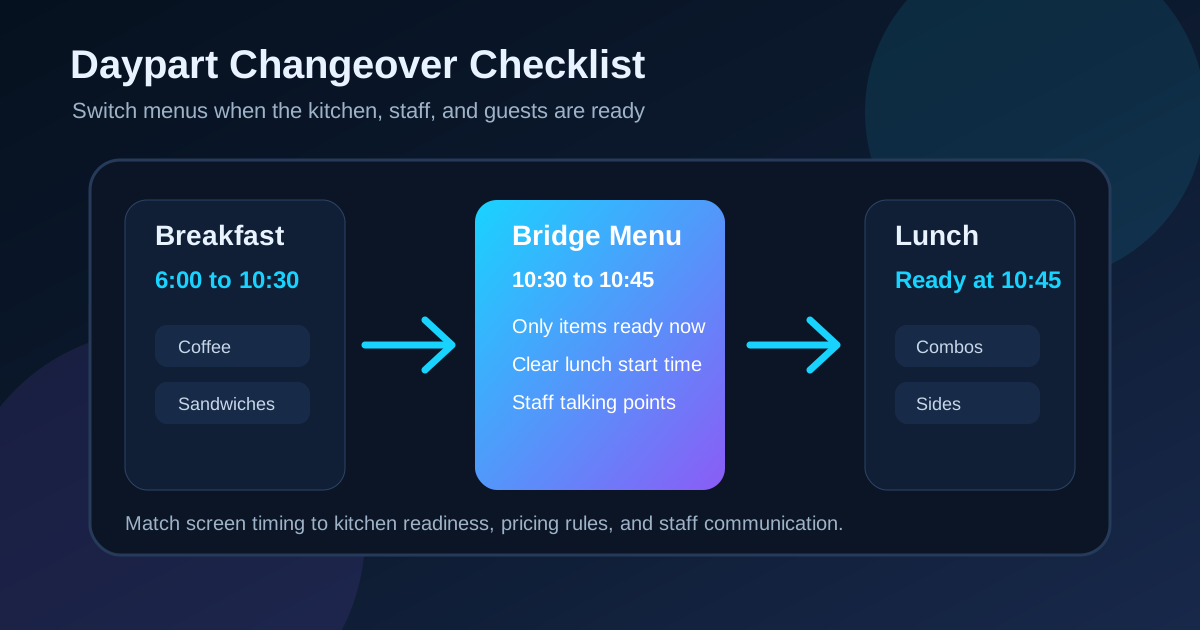
Many restaurants try to switch from one full menu to another in a single instant. That works only when operations are perfectly synchronized. A bridge menu is often better. It shows the limited set of items that are genuinely available during the transition window.
For example, a breakfast-to-lunch bridge might show coffee, bottled drinks, pastries, fries, one salad, and two fast lunch items. It can also include a clear note such as lunch favorites available at 10:45. The point is not to advertise less. The point is to avoid selling items the kitchen cannot confidently serve yet. Guests are usually more patient with a clear transition than with a menu that changes twice while they are deciding.
Make unavailable items disappear, not linger
A common daypart mistake is leaving old items visible with tiny unavailable notes. That slows ordering because customers still read the item, consider it, and then feel disappointed when they cannot buy it. If the item is not available, remove it from the main decision path. Keep the board focused on choices that can be ordered now.
If an item needs to remain visible for expectation setting, place it in a small upcoming section rather than in the active menu. This works for dinner specials, happy hour items, or late night snacks. Use simple copy: available after 4 PM, starts at 8 PM, or returns tomorrow morning. Do not bury availability rules in fine print. The customer should understand the timing before they reach the register.
Assign each screen a job during the switch
Multi-screen menu boards can become confusing during daypart changes when every screen tries to update at once. Give each screen a job. One screen can carry the active menu, one can show upcoming items, one can promote beverages or desserts, and one can hold pickup or ordering instructions. This keeps the transition organized instead of turning the board into a patchwork of old and new content.
During lunch rush, the primary screen should help guests choose quickly. Save lower-priority promotions for side screens or small tiles. If a seasonal item is not ready until dinner, it should not dominate the lunch board. Digital menus make it easy to rotate content, but rotation should support the order flow rather than interrupt it.
Check prices, modifiers, and combo logic
Daypart changes often create pricing mistakes. A breakfast sandwich may have one combo price in the morning and a different add-on structure at lunch. A drink upgrade may be valid all day, but a side substitution may only apply after lunch prep is ready. If the screen shows one rule and the point of sale uses another, staff have to fix the problem one customer at a time.
Before publishing the schedule, compare the board against the register setup. Look at base prices, combo prices, modifier labels, premium side charges, tax wording, and loyalty offers. The goal is not just visual accuracy. It is staff confidence. When cashiers know the screen matches the register, they can move faster and stop improvising explanations.
Write staff-friendly transition notes
The public menu is only one part of the workflow. Staff need a short version of what changes and when. A simple internal note can prevent mistakes: breakfast board ends at 10:30, bridge menu runs 10:30 to 10:45, lunch board starts when the lead confirms grill readiness, dinner specials appear at 4:00, late night board starts at 9:00.
Keep the language plain enough for a new employee to use with guests. If a customer asks why an item disappeared, the answer should be consistent. For example: We switch to lunch at 10:45 so the kitchen can finish the breakfast line and start fresh. That sounds much better than I am not sure why the screen changed.
Test the change from the customer side
Do not validate daypart menus only from a laptop or back office preview. Stand where customers stand and watch the transition. Can a guest tell what is available right now? Are the category labels still large enough? Does a limited-time offer steal attention from the actual ordering choices? Are old photos or prices still visible on a secondary screen?
Run the test during real lighting conditions. Morning glare, lunch crowding, and evening reflections can change what customers notice first. A beautiful dinner screen may be too dark for a window-facing counter at sunset. A breakfast board with pale type may look crisp on a monitor but weak from eight feet away. Daypart testing should include distance, glare, staff flow, and the actual order path.
Create a weekly daypart audit
Menus drift over time. A new seasonal drink gets added, a supplier shortage changes an ingredient, labor patterns shift, or the kitchen starts prepping lunch earlier. If the board schedule never gets reviewed, it slowly stops matching the restaurant.
Set a weekly five-minute audit. Check whether each daypart still starts at the right time, whether bridge menus are still needed, whether the most profitable items are featured in the right service period, and whether any staff complaints point to unclear wording. The review does not need to be complicated. It just needs to happen before small menu problems become daily friction.
Use this quick changeover checklist
Before the next daypart schedule goes live, review the basics:
- Does each menu change when the kitchen is actually ready?
- Is there a bridge menu for the transition window if needed?
- Are unavailable items removed from the active ordering path?
- Do upcoming items show clear start times?
- Does each screen have a specific job during the change?
- Do prices, modifiers, and combos match the register?
- Do staff have a plain-language explanation for the transition?
- Has the board been tested from the customer side at real distance?
- Is there a weekly review to keep timing accurate?
A good daypart changeover should feel almost invisible to guests. They see what is available, choose quickly, and trust that the menu matches what staff can serve. Behind the scenes, that smooth experience comes from planning the schedule around real operations. When digital menu boards, kitchen readiness, and staff communication work together, daypart changes stop being a daily scramble and become a reliable part of service.
Need daypart menus that stay clear during service?
Zenith Digital Menus designs, installs, and updates digital menu boards that match real restaurant operations. Contact us to plan a cleaner menu schedule.