Restaurant Digital Menu Specials Rotation Plan: Keep Offers Fresh Without Confusing Guests
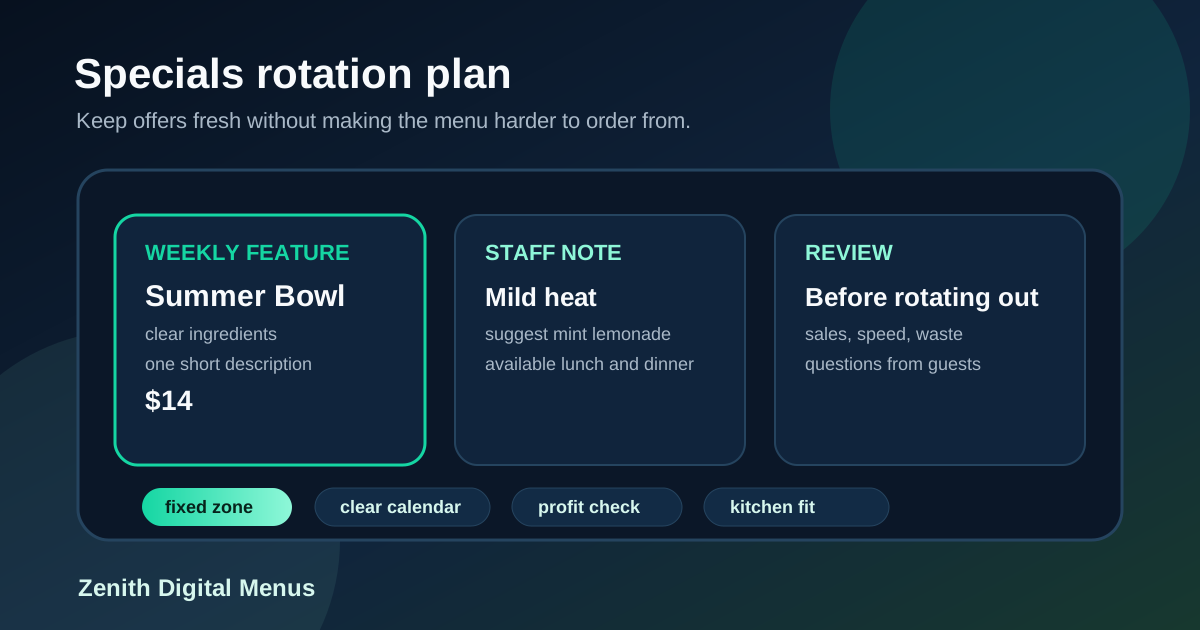
Restaurant specials are useful only when guests can understand them quickly and staff can execute them consistently. A good special can move seasonal ingredients, test a new item, support a slower daypart, or increase average order value. A messy special can do the opposite. It can crowd the digital menu board, slow down the line, create price confusion, and leave staff explaining details that should have been clear on screen.
Digital menu boards make specials easier to change, but that flexibility needs a plan. If every new idea gets added wherever there is space, the menu becomes harder to scan over time. Guests see too many badges, too many limited-time messages, and too many items competing for attention. The answer is not to stop running specials. The answer is to rotate them with a simple structure.
A specials rotation plan helps restaurants decide what to feature, where it appears, how long it runs, and what must be reviewed before launch. It protects readability while giving the business room to promote fresh offers. Here is a practical way to build one.
Choose one primary goal for each special
Start by deciding what the special is supposed to accomplish. A special that exists to use seasonal produce should be judged differently from a special designed to raise ticket size. A weekday lunch offer may focus on speed and value. A dinner feature may focus on margin and presentation. A dessert add-on may focus on attachment rate.
When the goal is clear, the menu placement becomes easier. If the goal is a faster lunch decision, place the special near popular lunch items and keep the description short. If the goal is an upsell, put the prompt beside the meal it complements. If the goal is to test demand for a new item, avoid burying it in a rotating carousel that guests may miss.
Limit the number of specials shown at once
Most restaurants do not need five specials fighting for attention on the main board. Too many offers make every offer weaker. Guests scan a menu under time pressure, especially at the counter or in a drive-thru lane. If the specials area looks crowded, many people skip it and order the familiar item.
A useful default is one featured special, one supporting add-on, and one seasonal drink or dessert if the concept supports it. That gives guests a clear new option without changing the whole ordering experience. Larger menus can support more, but each special should have a job and a defined location. If a new offer does not earn its space, keep it on the QR menu, table tent, or staff script instead of forcing it onto the primary screen.
Create a fixed specials zone
Specials work best when guests know where to look. A fixed zone might be the right side of the first screen, a narrow banner above combos, a tile beside best sellers, or a small panel that changes by daypart. The exact layout depends on the restaurant, but the location should be predictable.
A fixed zone also helps staff. They can say, our weekly special is in the green box on the top right, instead of explaining where to find it each time. Designers benefit too because new offers can be built for the same space, with the same headline length, description length, photo size, and price treatment. Consistency makes updates faster and keeps the board from drifting into clutter.
Use a simple rotation calendar
Build the rotation around how the restaurant actually operates. A cafe might plan monthly seasonal drinks with weekly pastry features. A fast casual restaurant might rotate a bowl or sandwich every two weeks. A pizza shop might run a weekday slice deal, a weekend family bundle, and one seasonal topping combination. The calendar should match purchasing, prep, training, and customer habits.
Do not change the main special so often that guests and staff cannot keep up. Frequent changes can be useful for social media, but the menu board is an ordering tool first. For many restaurants, a one or two week feature window gives enough time to learn whether the offer works. Shorter rotations are better for sell-through items or daily soups, as long as the screen can be updated accurately before service.
Write specials copy for fast decisions
A special needs more context than a regular item because guests are seeing it for the first time. That does not mean it needs a paragraph. The best copy answers four questions quickly: what is it, what is included, why is it worth noticing, and what does it cost?
For example: Summer Chicken Bowl, grilled chicken, corn salsa, avocado crema, limited this week, $14. Or: Family Pizza Bundle, large two topping pizza, salad, four drinks, saves $6, $32. These descriptions are not fancy, but they make the decision easy. Avoid vague labels like chef special, premium feature, or limited offer without explaining what the guest actually gets.
Connect each special to a natural upsell
Every special should have a next best addition. A spicy sandwich may pair with a cooling drink. A pasta feature may pair with garlic bread. A lunch bowl may pair with extra protein. A family bundle may pair with dessert. The upsell should feel helpful and specific, not like a generic add-on shoved onto the board.
Place the upsell close to the special so the guest sees the order as a complete choice. If the special is a value meal, show the upgrade inside the same tile. If the special is a premium entree, show the drink or side pairing nearby. This keeps the board useful and can raise check size without making staff push harder at the register.
Check kitchen capacity before promoting
A special that looks great on screen can still fail if the kitchen cannot make it during rush. Before launch, confirm prep time, ingredient availability, station load, packaging, modifiers, and whether the item slows down the normal line. If the item requires extra explanation or unusual assembly, consider running it during a lighter daypart first.
Digital menus can shape demand. Use that power carefully. If the grill is already the bottleneck at lunch, do not feature another grill-heavy item as the main special. If cold prep has capacity, a salad, bowl, drink, or dessert feature may be smarter. Menu engineering should support the kitchen, not just the marketing calendar.
Give staff a one-line briefing
Staff do not need a long memo for every menu update. They need the price, the ingredients, the timing, the most likely question, and the suggested add-on. A one-line briefing might read: Summer Chicken Bowl, $14, corn salsa and avocado crema, mild heat, suggest mint lemonade. Put that note in the same update workflow as the menu change so the team is never surprised by what guests see.
This matters because specials often create questions. Is it spicy? Can it be made vegetarian? Is it available all day? Does it come with a side? If the screen and staff answer the same way, the offer feels organized. If they conflict, guests lose confidence.
Review performance before rotating out
At the end of the run, capture a few simple notes. How many sold? Did it improve average ticket? Did it cause delays? Did staff get repeated questions? Were there waste issues? Did guests mention seeing it on the board? You do not need a complex dashboard to learn from specials. A small review after each rotation will quickly show which types of offers deserve more space.
Keep the winners in a seasonal library. A summer drink that sells well can return next year with better timing. A family bundle that performs on Sundays can become a recurring weekend feature. A special that tasted good but slowed the line can be redesigned as a pre-order or dine-in only offer. The rotation plan gets stronger when each promotion teaches the next one.
Digital menu specials should make the restaurant feel current, not chaotic. The best rotation plans use a fixed zone, a clear calendar, short copy, kitchen checks, staff notes, and simple performance reviews. With that structure, restaurants can keep offers fresh while protecting the one thing a menu board must always do well: help guests decide what to order.
Want specials that are easier to promote?
Zenith Digital Menus designs, installs, and updates menu boards that keep restaurant offers clear and current. Contact us to plan a cleaner specials workflow.