Restaurant Digital Menu Upsell Prompts: Make Add-Ons Feel Helpful
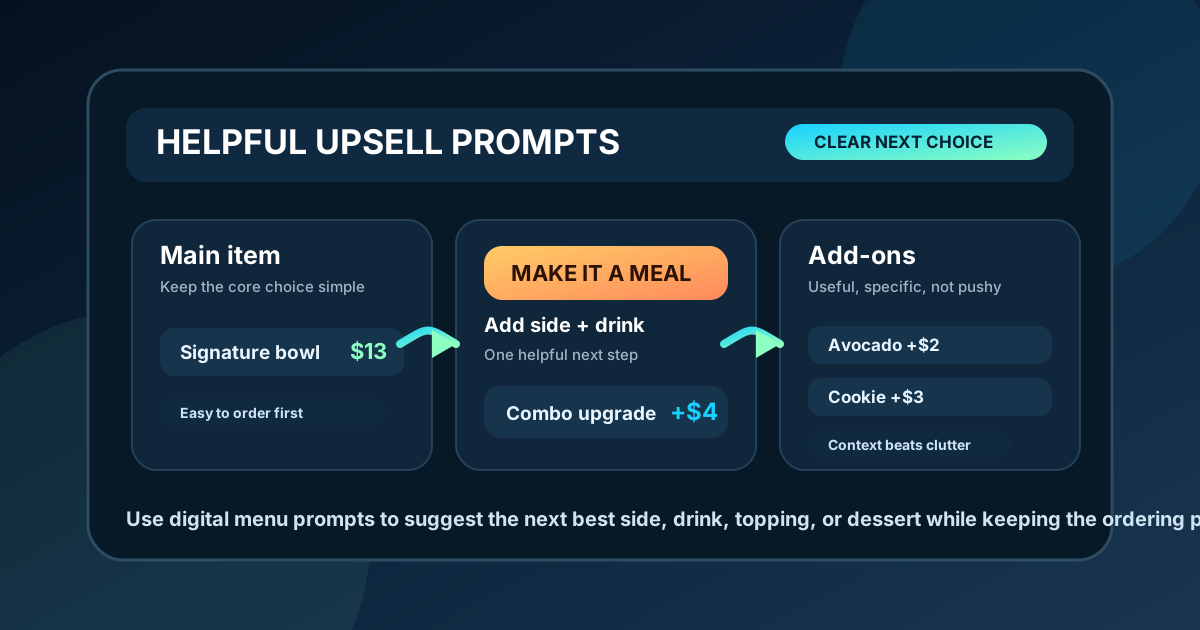
Upsells work best when they feel like service, not pressure. A good digital menu board does not simply shout bigger combo, extra topping, or dessert at every guest. It shows the most useful next choice at the moment the guest is already comparing options. That might be a side that completes the meal, a drink that pairs with a spicy item, a premium topping that makes a signature dish feel special, or a dessert that is easy to add at the end of the order.
The advantage of a digital menu is control. You can place prompts exactly where they make sense, keep them visually consistent, change them by daypart, and remove offers that are not working. The risk is clutter. If every item has a badge, every section has a banner, and every corner asks for another dollar, guests stop trusting the board. Helpful upsell prompts are selective, specific, and easy to ignore when they are not relevant.
Here is a practical way to design upsell prompts that support average ticket growth while keeping the ordering experience calm and readable.
Start with the guest decision
Before choosing an upsell, identify the decision the guest is making. Are they choosing a main item, comparing sizes, deciding whether a combo is worth it, or looking for something sweet after a meal? Each decision needs a different kind of prompt. A guest choosing an entree does not need five add-ons yet. They need a clear core item. A guest comparing a single item and a meal deal may need one sentence that explains what the combo includes.
Strong prompts answer a question that is already in the guest's mind. "Make it a combo with fries and a drink" works because it completes the meal. "Add avocado" works when it is next to a bowl, salad, burger, or sandwich where avocado makes sense. "Try our cookie" works better near checkout, on a rotating footer, or beside lunch combos than buried in the entree list.
Use one primary prompt per section
Digital boards become noisy when every item competes for attention. Instead of adding a prompt to every menu line, choose one primary upsell for each section. The burger section might promote a combo upgrade. The coffee section might promote oat milk or an extra shot. The bowl section might promote a premium protein. The family meal section might promote drinks or dessert.
This structure gives the board room to breathe. Guests can still find the base items quickly, and the upsell has enough space to be understood. If several add-ons are important, group them in a small "popular additions" tile rather than scattering badges everywhere. A clean prompt is more persuasive than a crowded one because guests can process it while the line is moving.
- Pick one main prompt per category or screen zone.
- Place the prompt close to the item it improves.
- Use short wording that explains the benefit and price.
- Remove prompts that create repeated staff questions.
Make combo value obvious
Combos are often the easiest upsell because they solve a real customer need. The guest wants a complete meal, and the restaurant wants a higher average ticket. The prompt fails when the board makes the combo feel vague. If customers have to ask which side, which drink, or whether substitutions cost extra, the menu is slowing the sale.
Show the base item, the combo upgrade, and the included pieces together. Use wording such as "Make it a combo: side and fountain drink +$4" or "Add chips and drink +$3.50." Keep the upgrade price near the value statement. If the full combo price is easier for your customers, show that instead. The key is consistency. Guests should not have to decode a new pricing style in every section.
Pair add-ons with the right items
Not every upsell belongs everywhere. A premium topping prompt should appear where it improves the item, not as a generic list at the bottom of the board. Add avocado near bowls, salads, and sandwiches. Add bacon near burgers and breakfast items. Add specialty milk near espresso drinks. Add protein upgrades near salads and grain bowls. Context makes the suggestion feel useful.
Specific prompts also help staff. When the board shows the most relevant add-ons in the right place, the cashier does not need to recite a long list. The customer sees the option, asks fewer questions, and makes a faster decision. This is especially valuable during lunch rushes, drive-thru service, and counter-service lines where every extra explanation adds friction.
Keep the price visible
An upsell without a visible price can feel like a trick. Guests may avoid it because they do not know the cost, or they may feel annoyed when the final total changes. Digital menu prompts should make the price easy to find and easy to understand. A small "+$2" beside the add-on is usually enough when the base item is already clear.
For larger upgrades, be more explicit. "Upgrade to premium protein +$5" is clearer than a badge that simply says premium. "Add dessert and coffee +$6" is clearer than "sweet finish." Clear pricing protects trust. It also helps the restaurant because guests who understand the cost are more likely to say yes without hesitation.
Use dayparts to keep prompts relevant
A prompt that works at noon may feel odd at 8 a.m. Digital menus make it possible to change upsells by daypart. Breakfast might promote extra espresso shots, hash browns, fruit cups, or bottled juice. Lunch might promote combos, premium sides, and faster grab-and-go add-ons. Dinner might promote shareables, desserts, seasonal drinks, or family meal upgrades.
Dayparting also helps with inventory. If a restaurant needs to move a seasonal soup, a limited dessert, or a high-margin beverage, the prompt can appear during the service window when it fits. The offer stays fresh without requiring a full redesign. Just keep the same visual system so the board does not feel like a new menu every few hours.
Test prompts against real staff questions
The best measure of an upsell prompt is not whether it looks clever. It is whether guests understand it. Ask staff which questions they hear most often: What comes with the combo? Can I add a side? Do you have non-dairy milk? Is that price extra? Can I make it spicy? Those questions reveal places where a prompt can help.
After the prompt goes live, listen again. If questions decrease and the item sells more often, the prompt is doing its job. If questions increase, simplify the copy, move the prompt closer to the related item, or make the price clearer. A digital menu should learn from service, not just from design preferences.
A simple upsell prompt checklist
Before publishing a new board, run a quick checklist. Does each section have no more than one primary upsell? Is the prompt next to the item it improves? Is the price visible? Is the wording specific? Does the offer make sense for the daypart? Can staff explain it in one sentence? Does the board still feel easy to scan from the customer line?
Restaurant digital menu upsell prompts should make ordering easier while giving guests good reasons to spend a little more. Focus on the next helpful choice, keep the price clear, limit visual clutter, and adjust prompts based on real service feedback. When the board respects the guest's attention, upsells feel less like advertising and more like a better ordering experience.
Want digital menu prompts that sell without clutter?
Zenith Digital Menus designs restaurant menu boards with clear combo upgrades, readable add-on prompts, daypart planning, and practical sales zones. Contact us to plan menu boards that help guests choose faster.